
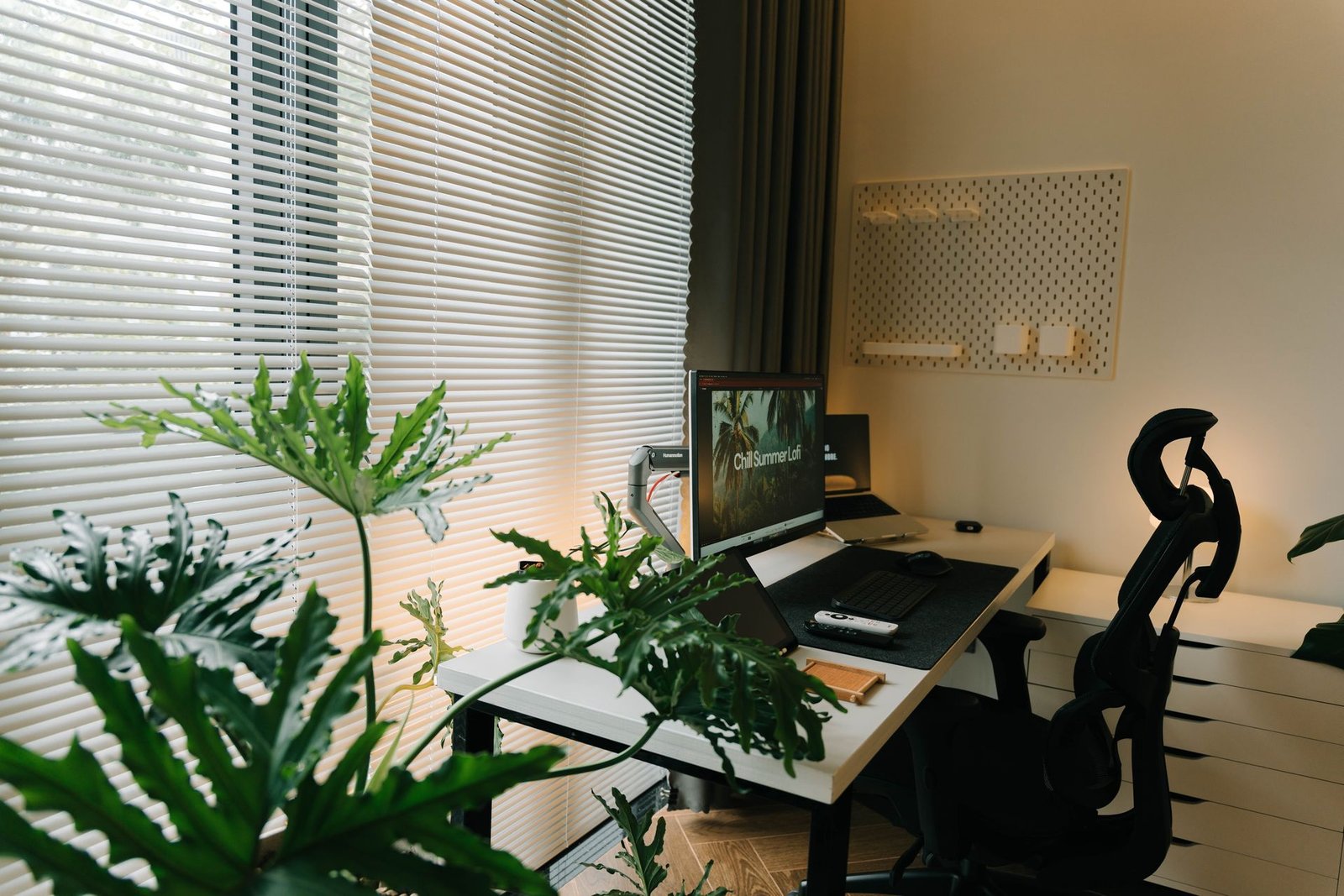
How to Create a Functional Home Office: A Setup That Works All Day
A functional home office comes down to five things: a quiet spot you can close off, a chair that supports your back, a screen at eye level, light in layers, and storage that keeps clutter off the desk. Get those five right and the room works.
You do not need a spare room, a standing desk, or a big budget. Most fixes below cost little or nothing — moving the desk, raising the laptop, adding a lamp. For the wider picture of how a room’s layout shapes the way you use it, see our guide to living room layout.
What a Functional Home Office Really Means
A functional office is not a pretty office. It is an office where you can sit for three hours without your neck hurting, find any paper in thirty seconds, and take a video call without apologizing for the background. Looks matter, but they come after the work works.
Three tests tell you if your setup is functional. First, the body test: after a full workday, nothing aches that did not ache before. Second, the focus test: you can start work in under a minute, without clearing the desk first. Third, the call test: your camera shows a calm background and your face is lit from the front. If any of those three fails, the fix is usually small.
Choose the Right Spot in Your Home
The spot decides almost everything else. A quiet corner beats a big room next to the kitchen, because noise and foot traffic break focus more than a small desk ever will. Look for a place with three things: a door or a screen you can close, natural light nearby, and a power outlet within reach.
A spare room is the easiest win. Keep the desk away from the bed and face the room, not the wall, so the space reads as an office first. Our guide to how to create a cozy bedroom shows how a bedroom stays restful even when part of it works hard. A living-room corner is the next-best option: pick the quietest corner, furthest from the television and the front door, and mark it with a rug or a screen. If your front door opens straight into the living area, our entryway decor guide shows how a small entry zone keeps traffic out of your work corner.
Plan Three Zones: Work, Storage, and Reference
A functional office has three zones. The work zone is the desk, the chair, and the screen. The storage zone holds files, supplies, and equipment. The reference zone holds what you consult while you work: a second screen, a whiteboard, a notebook, or a printer.
The most common layout mistake is pushing the desk flat against a wall and facing it. It saves space, and it is fine for a small nook, but it limits your view and makes the room feel like a cubicle. Where space allows, pull the desk out so you face into the room or toward the door, with a solid wall behind you. Leave at least 3 feet clear behind the chair. Put storage within arm’s reach but not on the desk — a small drawer unit beside it, a shelf above it, or a rolling cart under it.
Pick a Desk That Fits Your Work and Your Room
The desk is the second most important purchase after the chair, and size matters more than style. A standard desk is about 30 inches high and 48 to 60 inches wide, but a small room often needs less: 40 to 48 inches wide and 20 to 24 inches deep holds a laptop, a notebook, and a lamp, and still leaves walking room. Measure before you shop, and tape the outline on the floor so you can walk around it first.
Match the desk to the work you actually do. If you write and take calls, a simple flat desk with one drawer is enough. If you spread out papers or use two monitors, an L-shaped corner desk gives you a second surface. A sit-stand desk is useful but not essential: a good chair and correct screen height help far more and cost far less. The Spruce’s 35 best desk ideas for small spaces roundup is a good place to borrow a shape that fits your corner.
Choose a Chair That Protects Your Back
If your budget stretches to one quality item, make it the chair. A laptop on a dining table causes neck pain within months, and no monitor upgrade fixes a chair with no lumbar support. A supportive chair decides whether you can concentrate for three hours or start shifting about after forty minutes.

Look for four adjustments: seat height, lumbar support, armrests, and seat depth. The seat should rise and fall so your feet rest flat, the lumbar support should press gently into the small of your back, the armrests should hold your elbows at about 90 degrees, and the seat depth should leave a two-to-three-finger gap behind your knees. Set the chair up once, properly, and leave it alone. If the chair has no lumbar support, a rolled towel behind the small of your back works surprisingly well and costs nothing. Our guide to what is luxury furniture explains how a well-made piece can look at home in a living room and still support a full workday.
Set Your Screen, Keyboard, and Mouse at the Right Height
Three measurements fix most posture problems. First, the screen: the top edge should sit at or just below eye level, about an arm’s length away. A laptop flat on a desk sits roughly 10 inches too low. Raise it on a stand or a stack of books and add a separate keyboard.
Second, the elbows: adjust the chair so your forearms are roughly parallel to the floor when you type, elbows close to your body and bent at about a right angle. If the desk is too high and the chair cannot go higher, raise yourself and put something under your feet — a sturdy box works. Third, the feet: flat on the floor or on a footrest, with your lower back in contact with the chair. For two monitors, put the one you use most directly in front of you and the second to the side, angled slightly toward you.
Light It in Layers: Natural, Task, and Background
Lighting is where comfort and looks overlap most, and it is where most home offices fail. A single bright ceiling light puts the source behind your head, so you work in your own shadow. The fix is three layers: natural light, a task lamp, and a little background glow.

Natural light comes first. Place the desk so a window sits to your side, at roughly 90 degrees to the screen. Facing a window makes you squint; sitting with your back to one puts glare on the monitor. The task lamp is the second layer: choose a lamp with an adjustable arm and a dimmer, and place it on the side opposite your writing hand so it does not throw your shadow across the page. A bulb around 4000K — neutral white — suits paperwork and detail work. The third layer is background glow: a small lamp behind the monitor that softens the contrast between the bright screen and the dark wall. Our guide to luxury home accessories shows how a few well-chosen pieces can lift a room without cluttering it.
Storage That Stays Tidy Without a Big Cabinet
A clutter-free desk promotes a clear head, but storage only works if it is easier to use than the desk surface. The rule is simple: daily items live within arm’s reach, weekly items in a drawer, and monthly items in a closed cabinet or a box on a shelf.
Start with one drawer for the daily mess: pens, chargers, sticky notes, and today’s paperwork. Drawer dividers keep the drawer from becoming a second junk pile. A small tray on the desk holds the three things you use constantly — pen, notebook, phone. Use the walls: a pair of narrow shelves above the desk, no deeper than 8 inches, holds files, books, and a plant without eating floor space. End every workday with a 60-second reset: papers into the drawer, cups into the kitchen, cables back into their tray.
Cables and Tech: Power, Wi-Fi, and a Clean Desk
Cables are the fastest way a tidy office turns messy, and they are also a tripping hazard. Plan power before you buy anything else: count what needs a plug — laptop, monitor, lamp, printer, phone charger — and make sure the outlet count matches. A surge-protected power strip belongs under the desk, mounted to the desk leg or the wall, not lying on the floor.
Hire a licensed electrician for any new outlet, circuit, or hardwired light. Do not run extension cords under rugs, do not plug a space heater and a printer into the same strip, and do not open a panel or add wiring yourself. A short visit from a licensed professional costs far less than a fire or a fried laptop. For the cables, use a tray under the desk, clips along the desk edge, and short velcro ties instead of zip ties so you can change things later. Wi-Fi matters as much as power: test the speed at the desk before you commit to the spot, because video calls need a stable connection more than a fast one.
Focus Zone vs. Video-Call Zone
Your office has two jobs, and they need different setups. The focus zone is where deep work happens: screen at eye level, lamp on, phone out of reach, door closed. The video-call zone is what the camera sees: your face lit from the front, a calm background, and nothing distracting behind you.
Set the focus zone first. Face the desk away from the room’s main traffic lane so people passing behind you do not pull your eyes away. Put the phone in the drawer during focus blocks, and use a simple signal — headphones on, door closed. For calls, light beats camera every time. Face a window or put a lamp in front of you, aimed at your face, not behind you. A ring light gives a flat, clinical look; a lamp bounced off the wall in front of you is softer and cheaper. Keep the camera at eye level. This Old House covers the same trade-off in their guide to 12 home office layout ideas, including desk positions that face the room instead of the wall.
Small Home Office Ideas That Still Work
Not everyone has a spare room, and a small office can still work well if the three numbers are right: screen height, seat depth, and light angle. Get those right and a 3-foot alcove outperforms a badly arranged 6-foot desk run. Privacy beats daylight, and daylight beats square footage.
A closet office is the quietest small option: remove the doors, add a desk and a shelf, and the work disappears behind a curtain at night. A hallway alcove or a landing works too, as long as the setup can stay in place. A living-room corner needs a visible edge — a rug under the desk, a screen beside it, or a bookshelf as a divider. Our guide to small living room ideas for apartments shows how a small shared room can hold two jobs at once without feeling crowded. In a small space, choose a desk 30 to 36 inches wide and 20 to 24 inches deep, and use a wall-mounted monitor arm to free the desk surface. Keep one box for equipment if the desk is shared, and pack it away at the end of the day.
Luxury Touches That Stay Practical
A home office can look expensive without an expensive budget. Spend on the few things you touch and see up close: a real wood desk top, a leather desk mat, or a brass lamp add warmth without clutter, and they age better than plastic. Pick one style and stay with it. Our guide to interior design styles explained helps you name the style you already like, so the office matches the rest of your home.
Here is a labeled example, not a quote: one home office corner, set up two ways.
| Item | Modest setup (about $170) | Fuller setup (about $900) |
|---|---|---|
| Chair | Second-hand ergonomic chair, $80 | New adjustable chair with lumbar support, $350 |
| Desk | Existing table + laptop stand, $30 | Simple wood desk, 48 inches, $200 |
| Screen | Laptop raised on books, $0 | 24-inch monitor on an arm, $120 |
| Lighting | Desk lamp with dimmer, $25 | Desk lamp + floor lamp, $60 |
| Storage | Drawer divider set + tray, $20 | Small drawer unit + wall shelves, $90 |
| Cables | Velcro ties + under-desk tray, $15 | Cable tray + labeled power strip, $30 |
| Extras | Rolled towel for lumbar support, $0 | Desk mat + plant + pinboard, $50 |
| Example total | About $170 | About $900 |
The modest setup fixes the three numbers that matter — screen height, elbow angle, feet flat — for under $200, because the chair is second-hand and the laptop stand is a stack of books. The fuller setup buys comfort and calm: a real desk, a second screen, and storage that hides the mess.
Mistakes to Avoid With a Home Office
Working from the bed or the couch. Both feel comfortable for twenty minutes and punish your back for the rest of the day, and they blur the line between work and rest.
Facing the wall in a big room. A desk flat against the wall limits your view and makes the room feel like a cubicle. Where space allows, face into the room or toward the door.
Buying the desk before the chair. A beautiful desk with a bad chair is a room you cannot sit in. Buy the chair first and let it decide the desk height.
One light for the whole room. A single ceiling light leaves you in your own shadow and looking tired on calls. Layer it: daylight from the side, a task lamp, and a soft glow behind the screen.
Letting the desk become the storage. When the desk holds everything, nothing fits on it. Give every item a home off the desk, and end each day with the 60-second reset.
Forgetting the door. An office without a boundary is a desk in a hallway. A door, a screen, a curtain, or headphones-on as a signal tells the household you are working. A living room can hold an office well, and our guide to how to design a luxury living room shows how a shared room can stay calm when one corner works hard all day.
Frequently Asked Questions
How much space do I need for a home office?
A desk 40 to 48 inches wide and 20 to 24 inches deep, plus about 3 feet clear behind the chair, is enough. A 3-by-3-foot alcove can work if the screen height, seat depth, and light angle are right.
What should I buy first for a home office?
Buy the chair first, then something to raise your screen to eye level, then a separate keyboard. After that, add a desk lamp and storage. A standing desk, a second monitor, and a webcam can wait.
Where is the best place to put my desk?
In the quietest spot you can leave set up overnight, with a window to the side of the screen and a power outlet nearby. Face into the room when space allows.
How do I set up a home office in a small room?
Use a desk 30 to 36 inches wide, a wall-mounted monitor arm, and shelves above the desk. A closet office or a folding wall desk can disappear after work. Keep one box for equipment if the desk is shared, and pack it away at night.
How can I look good on video calls from home?
Face a window or put a lamp in front of you, and keep the camera at eye level. A lamp bounced off the wall looks softer and more natural than a ring light. Keep the background simple — a plain wall, a bookshelf, or a plant.
A functional home office is not about the perfect room or budget. It is about a quiet spot, a chair that supports you, a screen at eye level, light in layers, and a desk you can clear in a minute. Start with the chair, fix the three measurements, and let the rest follow. For more ways to shape the rooms around your work, see our guides to interior decorating ideas and modern dining room ideas.
Disclaimer: This article shares general home information for planning and decorating purposes only. Every home, room, budget, and work setup is different, so costs and results will vary. Check product labels and local rules before installing anything, and hire a licensed local professional for any electrical, structural, or load-bearing work.



One Comment